The April 24, 2026 ADA Title II compliance deadline requires all EdTech products serving public entities with populations of 50,000 or more to meet WCAG 2.1 Level AA accessibility standards. Non-compliant products face disqualification from procurement processes, as institutions cannot delegate legal liability to third-party vendors. EdTech product leaders should conduct accessibility audits now, create or update VPATs (Voluntary Product Accessibility Templates), and build accessibility into design processes rather than retrofitting compliance at the last minute.
Key Takeaways
- April 24, 2026 is the mandatory compliance deadline for public entities serving populations of 50,000+ (most K-12 districts and public universities)
- WCAG 2.1 Level AA is the legal requirement – but implementing WCAG 2.2 provides future-proofing
- Public entities are legally liable for third-party vendor compliance – schools cannot use non-compliant EdTech products without legal exposure
- 70% of the K-12 EdTech market (public schools) is affected by these procurement requirements
- Automated accessibility tools only catch 30-40% of issues – manual auditing and user testing are essential
- Your VPAT is a competitive differentiator – purchasing departments require documented compliance plans
- Building accessibility into your design process costs a fraction of retrofitting later – compliance becomes a natural outcome rather than a crisis
Table of Contents
- What Changed with the April 2026 ADA Title II Compliance Deadline?
- Why Has Accessibility Compliance Become Non-Negotiable in 2026?
- How Many Users Have Disabilities That Affect EdTech Use?
- What Are the Legal, Sales, and Brand Risks of Non-Compliance?
- What’s the Difference Between WCAG 2.1 and WCAG 2.2?
- What Are the Most Effective Strategies for Meeting the April 2026 Deadline?
- What Does Your Product Team Need to Do?
- How Can You Turn Compliance Into Competitive Advantage?
- Frequently Asked Questions
What Changed with the April 2026 ADA Title II Compliance Deadline?
On April 24, 2026, EdTech companies face a market-defining moment – a new ADA Title II compliance deadline. This is not just another regulatory update – it is a fundamental shift that will separate compliant, competitive products from those facing disqualification in procurement.
The continued rise in accessibility lawsuits, combined with the new federal mandate requiring WCAG 2.1 Level AA compliance, has transformed accessibility from a nice-to-have into a market imperative. Public schools represent approximately 70% of the K-12 EdTech market, and procurement processes have already begun adding strict accessibility requirements to RFPs. For EdTech product leaders navigating 2026’s budget pressures and heightened scrutiny, accessibility compliance now sits in a protected budget category alongside other legal mandates and operational necessities.
But here is the strategic opportunity: companies that approach accessibility as a design principle rather than a compliance checkbox create better products for everyone while meeting legal requirements. This guide will help you understand the new regulations, assess your risk, and build accessibility into your product development process in a way that strengthens rather than constrains your competitive position.
For more info, check out this article from Inside Higher Ed.
The New Regulations: What You Must Know
In April 2024, the Department of Justice finalized new ADA Title II regulations, establishing the first-ever enforceable technical standards for digital accessibility in education. After years of ambiguous guidance and accommodation-on-request approaches, institutions now face explicit, mandated standards: all digital content must meet WCAG 2.1 Level AA requirements by specific deadlines.

Key Compliance Dates
- April 24, 2026: Mandatory compliance for public entities serving populations of 50,000+ (includes most K-12 districts and public universities)
- April 26, 2027: Mandatory compliance for smaller entities
What Must Be Compliant
The regulations cover all digital content:
- Websites and web content
- Mobile applications
- Learning management systems
- Course materials and assessments
- Third-party EdTech tools and platforms
- Videos (requiring both captions and audio descriptions – a requirement many institutions are underestimating)
The Critical Change for EdTech Vendors
Public entities are legally liable for third-party vendor compliance. Schools and universities cannot delegate this responsibility. If your EdTech product does not meet WCAG 2.1 Level AA standards, institutions using your product face legal exposure – which means they will not use your product.
This is fundamentally different from previous accessibility guidance. The shift from “accessible on request” to “accessible by default” means everything must be compliant upfront, not retrofitted when a lawsuit arrives.
Why Has Accessibility Compliance Become Non-Negotiable in 2026?
The accessibility landscape has shifted dramatically. What was once treated as a best practice has become a procurement requirement, a competitive differentiator, and a protected budget category even as institutions face intense financial pressure.
The Litigation Landscape
While there are no new government enforcement mechanisms, the unambiguous WCAG 2.1 Level AA standard provides plaintiffs’ attorneys with clear grounds to target non-compliant entities. Industry analysts expect 5,500+ federal lawsuits in 2026, with private demand letters outnumbering filed complaints by 7-10x.
The pattern has evolved: many large companies with resources for dedicated accessibility programs have already been sued. Plaintiff firms are now identifying smaller companies to maintain volume. The increase in EdTech adoption during the pandemic brought more attention to brands that previously flew under the radar.
The Procurement Reality
Institutional buyers now face direct accountability for every purchasing decision. According to research from leading EdTech industry sources, nearly three-fourths of organizations have prioritized buying a product or solution because of its accessibility. It is increasingly becoming a line item on RFPs. If you cannot show that your product is compliant, or you do not at least have a Voluntary Product Accessibility Template (VPAT) that clearly outlines your plan to get there, procurement doors slam shut.
This connects directly to what we are calling the efficacy reckoning in EdTech. Institutional buyers must now justify each software investment to school boards, state agencies, and increasingly skeptical stakeholders who demand proof of value. The question is no longer Does this product seem promising but Can you prove this product delivers the outcomes we are accountable for – and does it meet our legal requirements
The Higher Ed Readiness Gap
The urgency is real because institutions are not ready. As reported by Inside Higher Ed, nearly half of U.S. universities have only one or two staff members working on technology accessibility, according to a 2023 Educause survey. Research from Anthology found that one-third of instructors remain completely unaware of the new requirements, and only 22% of instructors consider accessibility when designing course materials. As one higher education analyst warned about full compliance by all institutions in the next three months: “It is just not going to happen.”
This readiness gap creates both risk and opportunity for EdTech vendors. Compliant products become essential partners helping institutions meet mandates. Non-compliant products become liabilities institutions cannot afford.
How Many Users Have Disabilities That Affect EdTech Use?
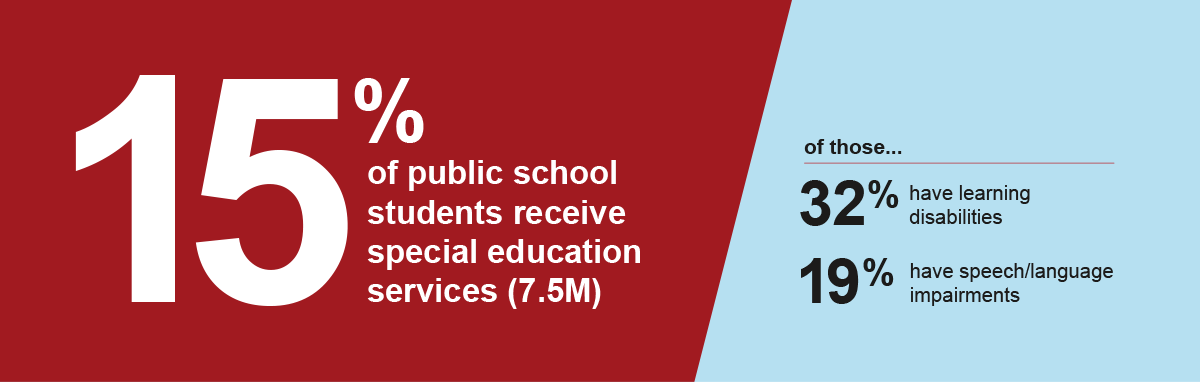
One of the most common mistakes product teams make is underestimating the number of users who live with disabilities. Numbers reported by the National Center for Education Statistics (NCES) in 2022-23 demonstrate the scale:
- 15% (7.5 million) of all public school students received special education services
- 32% of students receiving special education services have learning disabilities
- 19% of students receiving special education services had speech or language impairments
But accessibility affects everyone. Not all disabilities are permanent. Everyone encounters situational impairments – trying to use a product in bright sunlight, with only one hand, or while holding a child. Temporary disabilities like broken bones or medical recovery also impact how users interact with technology. When you design accessibly, you create better experiences for all users, not just those with permanent disabilities.
What Are the Legal, Sales, and Brand Risks of Non-Compliance?
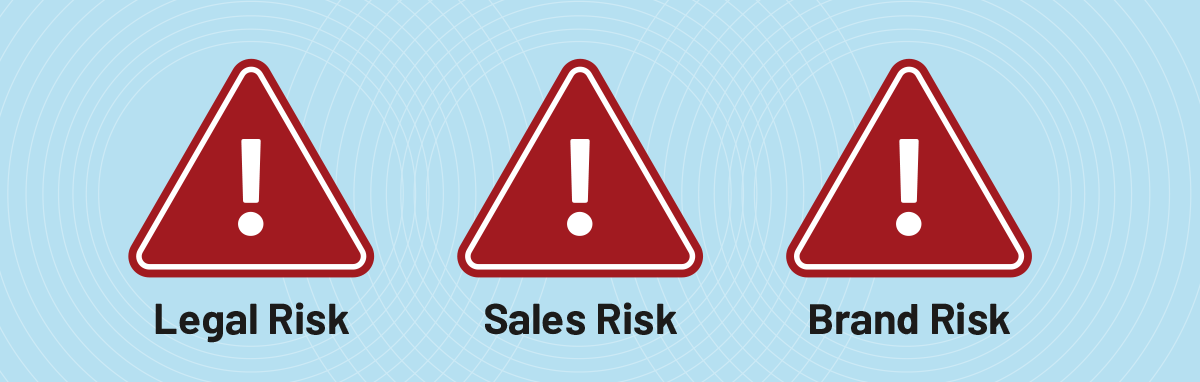
Non-compliance introduces risks across three categories, but each risk also represents a strategic opportunity for companies that get ahead of the April 2026 deadline.
1. Legal Risk
The Risk: If you are not in compliance with WCAG 2.1 standards and users can show that your product discriminates against them in a way that violates the law, they may choose to file costly lawsuits and the DOJ may get involved.
The Opportunity: Companies demonstrating proactive compliance protect themselves from litigation while building trust with risk-conscious institutional buyers. Your VPAT becomes a competitive advantage in procurement.
2. Sales Risk
The Risk: Legal teams and purchasing departments at educational institutions are looking for ways to reduce their own liability. They will place higher scrutiny on third-party products and favor those that are compliant. According to Global Growth Insights, public schools represent approximately 70% of the K-12 EdTech market – non-compliant vendors face significant disqualification risk.
The Opportunity: In a market where buyers demand proof of value, accessibility compliance provides concrete, verifiable evidence that your product meets institutional requirements. As budgets tighten and scrutiny intensifies, accessibility sits in a protected category alongside other legal mandates.
3. Brand and Competitive Position
The Risk: Instructors and students influence purchasing decisions. Your brand may be judged harshly if deemed apathetic to users with disabilities. Once buyers see your product as a risk, that is a deep hole to dig out from.
The Opportunity: Early adopters of accessibility best practices position themselves as market leaders. You demonstrate user-centered design principles and earn loyalty from users who benefit from accessible features. In 2026’s efficacy reckoning, this matters.
What’s the Difference Between WCAG 2.1 and WCAG 2.2?
The World Wide Web Consortium (W3C) provides comprehensive international standards for accessibility through the Web Content Accessibility Guidelines (WCAG). The W3C is widely considered the leading authority for creating accessible websites and digital products.
The Legal Requirement: WCAG 2.1 Level AA
The April 2026 ADA Title II mandate requires WCAG 2.1 Level AA compliance. This is the legal standard that all public entities and their third-party vendors must meet. WCAG 2.1 includes 50 success criteria (30 Level A criteria and 20 Level AA criteria) covering requirements such as:
- Text alternatives for images
- Keyboard navigation
- Sufficient color contrast
- Captions for videos
- Clear heading structure
- Accessible forms and error messages
The Strategic Recommendation: WCAG 2.2 Level AA
WCAG 2.2, published in October 2023, is the current standard. It includes 9 new success criteria beyond WCAG 2.1, focused on mobile accessibility, cognitive disabilities, and low vision users. While not legally required by the April 2026 mandate, product teams should implement WCAG 2.2 to future-proof compliance and deliver better experiences.
The additional criteria in WCAG 2.2 address:
- Dragging movements (alternatives for users who cannot perform dragging)
- Target size (minimum clickable area for touch targets)
- Focus appearance (visible keyboard focus indicators)
- Consistent help (predictable location of help mechanisms)
Understanding Levels of Conformance
W3C outlines three levels of WCAG conformance – A, AA, and AAA. It is widely accepted best practice for products to conform to AA compliance levels. According to W3C: “It is not recommended that Level AAA conformance be required as a general policy for entire sites because it is not possible to satisfy all Level AAA Success Criteria for some content.”
ADA Compliance vs. Inclusive Design
ADA compliance is what is required. Inclusive design is what is right. The majority of recent federal claims reference the obligation to meet WCAG 2.1 AA standards. Adopting an inclusive design program, however, is a philosophical approach that goes well beyond mere compliance.
Inclusive design considers disabilities not covered by ADA requirements and benefits all users. Those who practice inclusive design in product development are typically already fully compliant or well on their way. Those who only seek to meet basic compliance levels miss opportunities to raise user experience to the next level.
What Are the Most Effective Strategies for Meeting the April 2026 Deadline?
As the April 2026 deadline approaches, strategic prioritization matters more than ever. Here is how to approach compliance in a way that strengthens your product and competitive position.

1. Conduct a Comprehensive Audit and Document Your Plan
Your UX team can help with compliance standards and automated tools, but for comprehensive review, involve specialized accessibility service providers. With the April deadline approaching, full compliance may not be achievable for complex systems. Focus on demonstrating good-faith effort: documented assessment of current state, prioritized remediation roadmap, and evidence of progress.
Critical: Automated accessibility checkers only identify 30-40% of compliance issues. Manual auditing, user testing with assistive technologies, and expert review are essential.
Accessibility service providers that can help:
2. Create or Update Your VPAT
The Information Technology Industry Council (ITI) offers the Voluntary Product Accessibility Template (VPAT) free of charge. It is the leading global reporting format adopted by purchasers at federal, state, and local governments, non-profits, and many private-sector procurement departments.
Your VPAT is not just documentation – it is a competitive differentiator. Purchasing departments want to see it because it helps them understand whether your product introduces risk for their organization. Your VPAT should reference WCAG 2.1 Level AA as the legal compliance standard, and can note if you also meet WCAG 2.2 criteria.
3. Build Accessibility Into Your Culture and Process
Encourage your team to understand accessibility deeply. Conduct empathy-building sessions where team members use your product with simulated disabilities. While not a replacement for testing with actual users with disabilities, this helps teams understand barriers they normally take for granted.
Accessibility issues manifest during design and engineering phases, but their roots take hold earlier when accessibility is not a cultural tenet held by all members of the product team. Our products constantly evolve – so should how we think about accessibility.
“Accessibility is not something you bolt on at the end to meet compliance – it is a design principle that makes products better for everyone. Companies scrambling to remediate by April are learning an expensive lesson: building accessibility into your design process from the start costs a fraction of retrofitting later. When you design with inclusive principles, compliance becomes a natural outcome rather than a crisis.”
— Annie Hensley, Director of UX Design, Openfield, IAAP Certified Professional in Accessibility Core Competencies (CPACC)
4. Test With Users Who Have Disabilities
The only way to ensure your product works for all users is testing with people who represent your full user base. Too often, EdTech teams neglect to test features with this group.
This gap represents both risk and opportunity. Companies that authentically test with users with disabilities catch issues automated tools miss and demonstrate genuine commitment to accessibility.
What Does Your Product Team Need to Do?
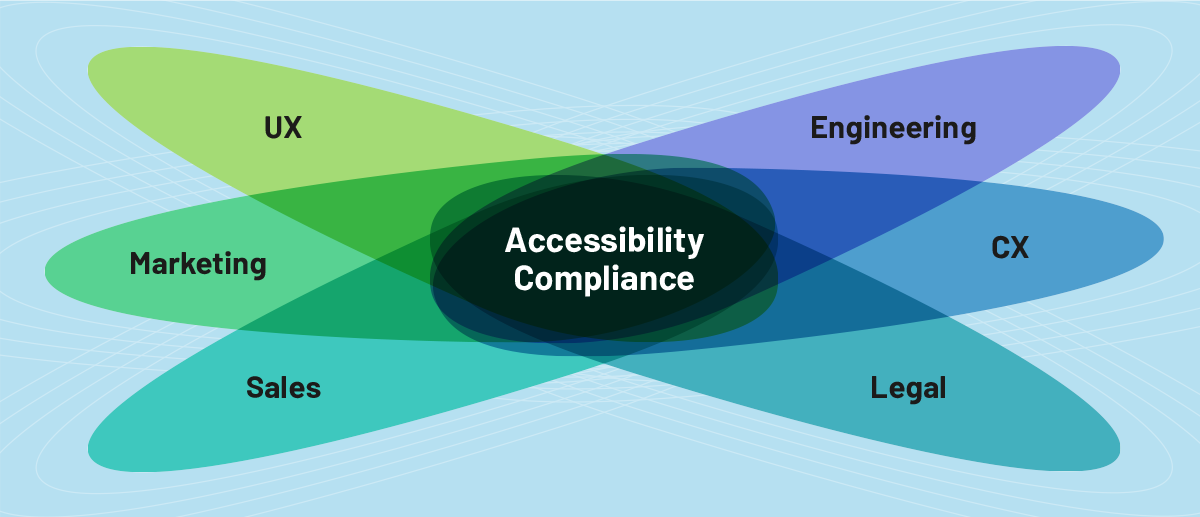
Accessibility is a team sport requiring participation across product leadership, UX, engineering, marketing, sales, and legal. Here is what each group needs to focus on as you approach the April 2026 deadline.
Product Leadership
Product leaders must insist that all releases comply with WCAG 2.1 Level AA standards at minimum – the legal requirement under the ADA Title II mandate. Teams should strongly consider implementing WCAG 2.2 to future-proof compliance. Without meeting at least WCAG 2.1 AA, there is no V in MVP. Be sure leadership understands what is at stake and approves budgets that allow your team to do what is needed.
Form a council of representatives from key disciplines to meet regularly, assess risks, set goals, and ensure active participation. This should include UX, engineering, marketing, sales, customer support, and legal. Creating shared ownership inspires faster adoption. Larger companies should consider creating a role dedicated solely to ensuring accessibility.
Keep in mind that compliance does not have to happen all at once. Organize issues into manageable chunks starting with the worst violations. Make a plan to introduce improvements in stages. If your buyers know you have a plan and see progress, they are much less likely to abandon your product abruptly.
Questions for Your UX Team
Your UX team should play the central role in accessibility efforts. Meeting WCAG standards is about ensuring your product delivers a good experience across ALL users.
- Can we demonstrate that we are meeting WCAG 2.1 Level AA standards (the legal requirement)?
- Are we also implementing WCAG 2.2 criteria for future-proofing?
- What is our process for ensuring accessibility compliance?
- What tools do we use to assess compliance?
- How are we documenting accessibility decisions?
- Are we incorporating inclusive design methodologies?
- Are we testing with users who have disabilities?
- How are we preparing for the April 24, 2026 deadline?
Questions for Your Engineering Team
Engineering teams take great pride in user experience quality. Product owners should involve engineering early so they understand what is at stake and can participate actively in solving compliance issues and establishing long-term best practices.
- Does our code inherently address WCAG 2.1 Level AA standards?
- Are we building toward WCAG 2.2 compliance for future-proofing?
- What QA methods do we use to test for compliance?
- What tools are we using for automated and manual testing?
- Are we building accessible components that can be reused?
- How are we incorporating accessibility success criteria into our process?
Marketing and Sales: Turn Compliance Into Competitive Advantage
Your sales and marketing teams need to understand both risks and rewards. If your product is not yet fully compliant, they need to know how to talk about your remediation plan. Once compliance is achieved, they have a new point of differentiation.
According to Level Access’s State of Digital Accessibility Report for 2025-2026, accessibility is a business imperative:
- 89% of respondents believe it provides a competitive advantage
- 75% say it contributes to improved revenue
- 90% say it contributes to improved customer satisfaction
Remember that accessibility is not limited to the product itself. Content such as emails, blog posts, webinars, and social media must also be accessible. Create dialogue with brand guideline keepers so visual and verbal language supports accessibility. Brand standards are often created without consideration for how colors, font sizes, and contrast affect digital accessibility.
Key Questions:
- Have we audited competitors’ accessibility levels?
- Does our marketing make it easier for buyers to choose us because we meet WCAG 2.1 Level AA standards?
- Are we hearing accessibility questions in RFPs?
- Can we clearly communicate our compliance status and VPAT to procurement teams?
Legal: Protecting the Business
According to Level Access’s State of Digital Accessibility Report for 2025-2026, legal risk remains high with 80% of respondents in the U.S. public sector noting they feel their organization is at risk.
Your legal department or outside counsel should be involved in understanding compliance implications and helping the product team take appropriate measures to protect the business.
Key Questions:
- Is our legal team aware of the April 2026 deadline and the WCAG 2.1 Level AA requirement?
- Is legal sharing this information with executive leadership?
- Do we have resources to help the product team stay current with shifting compliance regulations?
- What level of compliance will be required by leadership and when should legal be involved in reviews?
How Can You Turn Compliance Into Competitive Advantage?
The April 24, 2026 deadline is not just a regulatory hurdle – it is a market-defining moment that will separate EdTech companies into two categories: those that approach accessibility strategically and those that scramble to retrofit compliance at the last minute.
As institutions face 2026’s efficacy reckoning – where every product must prove measurable value under intense budget scrutiny – accessibility compliance sits in a protected category. It is not a nice-to-have that gets cut when budgets tighten. It is a legal mandate, a procurement requirement, and a risk mitigation necessity.
But the real opportunity goes beyond avoiding disqualification. Companies that build accessibility into their design process from the start:
- Create better products for everyone, not just users with disabilities
- Position themselves as market leaders in user-centered design
- Reduce long-term costs compared to retrofitting compliance
- Build trust with risk-conscious institutional buyers
- Demonstrate genuine commitment to serving all learners
As the April 24, 2026 deadline approaches, the window for action is closing. But teams that act strategically now – documenting their current state, prioritizing remediation based on WCAG 2.1 Level AA requirements, building accessibility into their process, and testing with actual users – will not just meet compliance requirements. They will strengthen their competitive position in a market increasingly defined by evidence, accountability, and user-centered design.
The question is not whether accessibility compliance matters. The question is whether you will approach it as a crisis to manage or as an opportunity to differentiate.
Want to ensure your product is aligned with new requirements?
Schedule a 30-minute discovery call to learn how you can ensure your product meets accessibility requirements.
Frequently Asked Questions About the April 2026 ADA Compliance Deadline
What is the April 24, 2026 ADA compliance deadline?
The April 24, 2026 deadline is when public entities serving populations of 50,000 or more must comply with new ADA Title II regulations requiring all digital content to meet WCAG 2.1 Level AA accessibility standards. This includes K-12 school districts, public universities, and all third-party EdTech tools these institutions use.
Who must comply with the new ADA Title II regulations?
Public entities (schools, universities, government agencies) must comply, and they are legally liable for third-party vendor compliance. This means if your EdTech product serves public institutions and does not meet WCAG 2.1 Level AA standards, those institutions face legal exposure for using your product. Smaller entities have until April 26, 2027 to comply.
What is WCAG 2.1 Level AA compliance?
WCAG 2.1 Level AA is the Web Content Accessibility Guidelines standard that includes 50 success criteria covering requirements like text alternatives for images, keyboard navigation, sufficient color contrast, captions for videos, clear heading structure, and accessible forms. It is the minimum legal requirement under the new ADA Title II regulations.
Do I need to meet WCAG 2.1 or WCAG 2.2?
WCAG 2.1 Level AA is the legal requirement you must meet by April 24, 2026. However, WCAG 2.2 (published October 2023) is the current standard and includes 9 additional success criteria focused on mobile accessibility, cognitive disabilities, and low vision users. We recommend implementing WCAG 2.2 to future-proof your compliance and deliver better user experiences.
What happens if my EdTech product isn’t compliant by April 2026?
Non-compliant products face three major risks: legal liability (increased lawsuit risk for you and your customers), sales disqualification (procurement departments will not purchase products that create legal exposure), and brand damage (being perceived as apathetic to users with disabilities). Approximately 70% of the K-12 EdTech market serves public schools affected by this mandate.
What is a VPAT and do I need one?
A VPAT (Voluntary Product Accessibility Template) is a standardized document that details how your product meets accessibility standards. Purchasing departments at federal, state, and local institutions require VPATs to assess whether your product introduces legal risk. Your VPAT should reference WCAG 2.1 Level AA compliance and outline your remediation plan if not yet fully compliant. It is both a compliance document and a competitive differentiator.
Can automated tools check my product for accessibility compliance?
Automated accessibility checkers only identify 30-40% of compliance issues. While they are helpful for catching common problems like missing alt text or color contrast issues, they cannot evaluate complex interactions, logical content structure, or real-world usability with assistive technologies. Comprehensive compliance requires manual auditing, expert review, and user testing with people who use assistive technologies.
Should I hire an accessibility service provider?
Your internal UX team, or a specialized EdTech UX partner like Openfield can help ensure your product meets accessibility standards from the onset. For more comprehensive accessibility audits and remediation, specialized accessibility service providers offer expertise your internal UX team may lack. Providers like AudioEye, Deque, Knowbility, Level Access, and UsableNet can conduct thorough assessments, help prioritize remediation efforts, and provide guidance on building accessibility into your development process. With the April 2026 deadline approaching, professional expertise can accelerate your compliance timeline.
What’s the difference between ADA compliance and inclusive design?
ADA compliance is the legal minimum – meeting WCAG 2.1 Level AA standards to avoid legal liability. Inclusive design is a broader philosophical approach that considers disabilities not covered by ADA requirements and benefits all users, not just those with permanent disabilities. Companies that practice inclusive design typically achieve ADA compliance as a natural outcome while creating superior products for everyone. Inclusive design considers situational and temporary impairments that affect all users.
What should I do first to prepare for the April 2026 deadline?
Start with a comprehensive accessibility audit using both automated tools and manual review to understand your current compliance state. Document your findings, prioritize remediation based on severity (focusing on the worst violations first), and create or update your VPAT. Form a cross-functional accessibility council including UX, engineering, legal, and product leadership to ensure shared ownership. Most importantly, begin building accessibility into your design and development process now rather than treating it as a one-time remediation project.
Ready to Navigate the April 2026 Deadline Strategically?
If you would like to talk about how strategic UX research and design can help you navigate the April 2026 deadline while strengthening your product and competitive position, contact us.